

Yes, modern GPS collars let you map and run multiple safe zones at once, and most owners should. Start by mapping one primary roaming boundary, then layer in keep-out zones around the pool, the vegetable garden, or the road. Consistency in your dog’s warning signals matters more than the number of zones you create, and some systems let you build that structure without buried wire or a required subscription.
TL;DR:
- Most GPS collars can handle multiple safe zones, including primary boundaries and keep-out areas, without requiring a wired system or subscription.
- Custom polygon fences offer more precise containment around hazards like pools or gardens but require longer setup and larger effort than circular fences.
- GPS drift caused by weather, obstacles, or signal interference can shift boundary accuracy, so testing zones at different times improves reliability.
- Training dogs to understand boundaries involves visual cues, tone warnings, and gradual exposure, typically taking several weeks for full comprehension.
- Regularly verifying zone accuracy and adjusting for property changes or dog behavior ensures long-term containment effectiveness without relying solely on technology.
Table of Contents
- How Do Multiple Safe Zones Actually Work?
- How Do You Plan and Map Several Zones?
- What’s a Training Plan That Actually Teaches the Boundaries?
- How Do You Manage and Troubleshoot Multiple Zones Over Time?
- Why Layered Zones Are the Practical Middle Ground
- HAVEN Freedom: One Collar, as Many Zones as Your Property Needs
- Sources
- FAQ
How Do Multiple Safe Zones Actually Work?
Every GPS fence gives you two ways to draw a boundary: circular and custom. A circular, or radius, fence sets a fixed distance from a center point, which takes seconds to configure and suits an open yard with no obstacles. A custom polygonal fence traces the actual shape of your property, hugging a driveway curve or carving around a shed, and it takes more effort but contains your dog far more precisely near real hazards.
Inside either fence type, you can typically set a warning zone, a buffer strip where the collar alerts your dog before the hard boundary. The American Kennel Club notes that accuracy and reliability are two separate things. Accuracy is whether the boundary sits where you drew it on the map. Reliability is whether your dog gets the same warning, at the same distance, every single time. A fence can be accurate and still fail your dog if the alert timing wanders.
That wandering usually comes down to GPS drift. Signals bounce off tree cover, buildings, and even heavy cloud cover, shifting a boundary line by a few feet in different conditions. Most systems manage that variation within predictable tolerances, but you should still test a new zone at different times of day before trusting it fully.
Quick reference for choosing a fence type:
- Circular fence: fastest setup, best for open yards with no fixed hazards nearby.
- Custom polygon: slower to draw, best for irregular lots, pools, or gardens you need to exclude precisely.
- Warning zone: the buffer that teaches your dog to turn back before reaching the hard edge.
- Drift tolerance: expect small boundary shifts under tree cover or bad weather, and test accordingly.
Pro Tip: Walk each new boundary yourself with the collar before your dog ever gets near it. If the warning tone fires somewhere different than you expected, fix the map before you start training, not after.
How Do You Plan and Map Several Zones?
Good zoning starts before you open the app. Walk the property first and mark every hazard: the pool edge, the property line facing the street, thorny landscaping, a neighbor’s yard with an unfriendly dog. Decide whether you need a different footprint for daytime supervised play versus nighttime containment, since many owners run a tighter zone after dark.
From there, most GPS collar apps offer two mapping workflows:
- Walk-and-capture. You physically walk the boundary line with your phone and collar, and the app traces your path in real time. This method is slower but tends to match your actual property lines more precisely, since you’re mapping the ground you actually walked.
- Draw-on-map. You sketch the boundary directly on a satellite image inside the app. This is faster and works well for simple shapes, but it can drift from the real terrain if the satellite imagery is outdated or the property has subtle contours.
Once your primary roaming area is set, layer in exclusion zones on top of it. Most apps place no hard limit on the number of fences you create, so you can stack a pool exclusion, a garden exclusion, and a seasonal zone (a fenced construction area, a temporary garden bed) without starting over. Keep your workflow tight:
- Map the primary roaming boundary first, using the widest safe footprint your property allows.
- Add keep-out zones for permanent hazards, checking that they don’t overlap the primary boundary’s warning strip in a confusing way.
- Add seasonal or temporary zones separately, and remove them once the hazard is gone so old warning tones don’t linger.
- If you have multiple dogs on separate collars, map each dog’s zones independently. Overlapping zones with different tolerance settings can trigger inconsistent alerts if the dogs share a yard.
Our GPS dog fence setup guide walks through the full app workflow if you want a working boundary within a couple of hours.
What’s a Training Plan That Actually Teaches the Boundaries?
A fence only works if your dog understands it, and that takes weeks, not a single afternoon. The AKC’s boundary training method uses physical flags along the line so your dog has a visual cue that matches the invisible one.
- Familiarize. Place flags along each new boundary and walk your dog past them on a leash, pairing the flag line with a clicker and treats. Do this indoors with mock flags first if your dog is anxious about new objects outside.
- Introduce the tone. Let your dog approach the flagged line off leash in a low-distraction moment. When the collar’s warning tone fires, call your dog back and reward heavily the second they retreat. Repeat until turning back becomes automatic.
- Build distraction and distance. Gradually add squirrels, neighbors, other dogs, and longer stretches of unsupervised time. Watch closely for stress signals, tucked tail, freezing, refusal to move, and dial the difficulty back if you see them.
Behaviorists are clear that corrective stimulation should never carry the training on its own. The AVMA advises against relying on aversive corrections as a primary teaching tool, recommending instead a command, response, reward sequence, with corrective features paused entirely if a dog freezes or shows real anxiety. If that happens repeatedly, a certified behaviorist should get involved before you push further.
Pro Tip: Train each new zone separately, even if it overlaps ground your dog already knows. A dog that’s rock solid on the backyard boundary can still get confused the first week you add a garden exclusion zone inside that same yard.
For a structured version of this progression, our 14-day boundary training plan breaks it into daily sessions.
How Do You Manage and Troubleshoot Multiple Zones Over Time?
Zones aren’t a one-time setup. Property changes, seasons change, and dogs test boundaries differently as they grow more confident. Run a repeated walk-test on each zone every few months: walk the edge at different times of day and confirm the warning tone fires at a consistent distance every pass.
When a dog keeps crossing a boundary despite training, work through this checklist before assuming the dog is the problem:
- GPS drift under tree cover or bad weather can shift where a boundary line actually sits.
- A mis-drawn polygon, especially one built with draw-on-map instead of walk-and-capture, may not match the real terrain.
- Collar placement or low battery can weaken signal accuracy at exactly the moment you need it most.
- App sync delays can leave the collar running an outdated version of your zone map.
- Signal interference from dense buildings or heavy foliage can affect both accuracy and alert timing.
The AKC points out that accuracy and reliability are separate problems, and your escape alert logs usually tell you which one you’re facing. Frequent alerts at the same spot suggest a mapping fix. Alerts scattered randomly across the boundary usually point to signal or hardware issues, not a dog that needs retraining. Our guide on wireless fence interference covers the technical side in more depth, and this troubleshooting resource for training setbacks is a solid next stop if the issue looks behavioral rather than technical.
If a dog does get out, don’t chase. Use the escape alert to locate them calmly, retrieve them without drama, then review both your zone map and your training log before the next outing. Escapes are data, not failures.

Why Layered Zones Are the Practical Middle Ground

Most owners who ask about multiple safe zones aren’t trying to build a fortress. They want their dog loose in the yard during the day, kept out of the pool without a physical gate, and safely contained while they’re at work, all without wiring their whole property. Layered zones solve that because they let freedom and restriction coexist on the same lot instead of forcing a single all-or-nothing boundary.
We’ve built our setup guides and training resources around that reality, because a fence map is only half the job. The other half is teaching your dog to trust it. If a boundary isn’t landing, or a dog is showing anxiety instead of learning, pause the corrective settings and lean on the behaviorist guidance the AVMA lays out. Technology handles the containment. Consistency and patience handle the rest.
— Haven
HAVEN Freedom: One Collar, as Many Zones as Your Property Needs
Havenfreedom built the HAVEN Freedom collar around exactly the layered setup this guide describes. Its dual-band GPS creates customizable wireless boundaries stored directly on the collar, so you can map a primary roaming area plus separate keep-out zones for the pool or garden, all without burying a single wire.
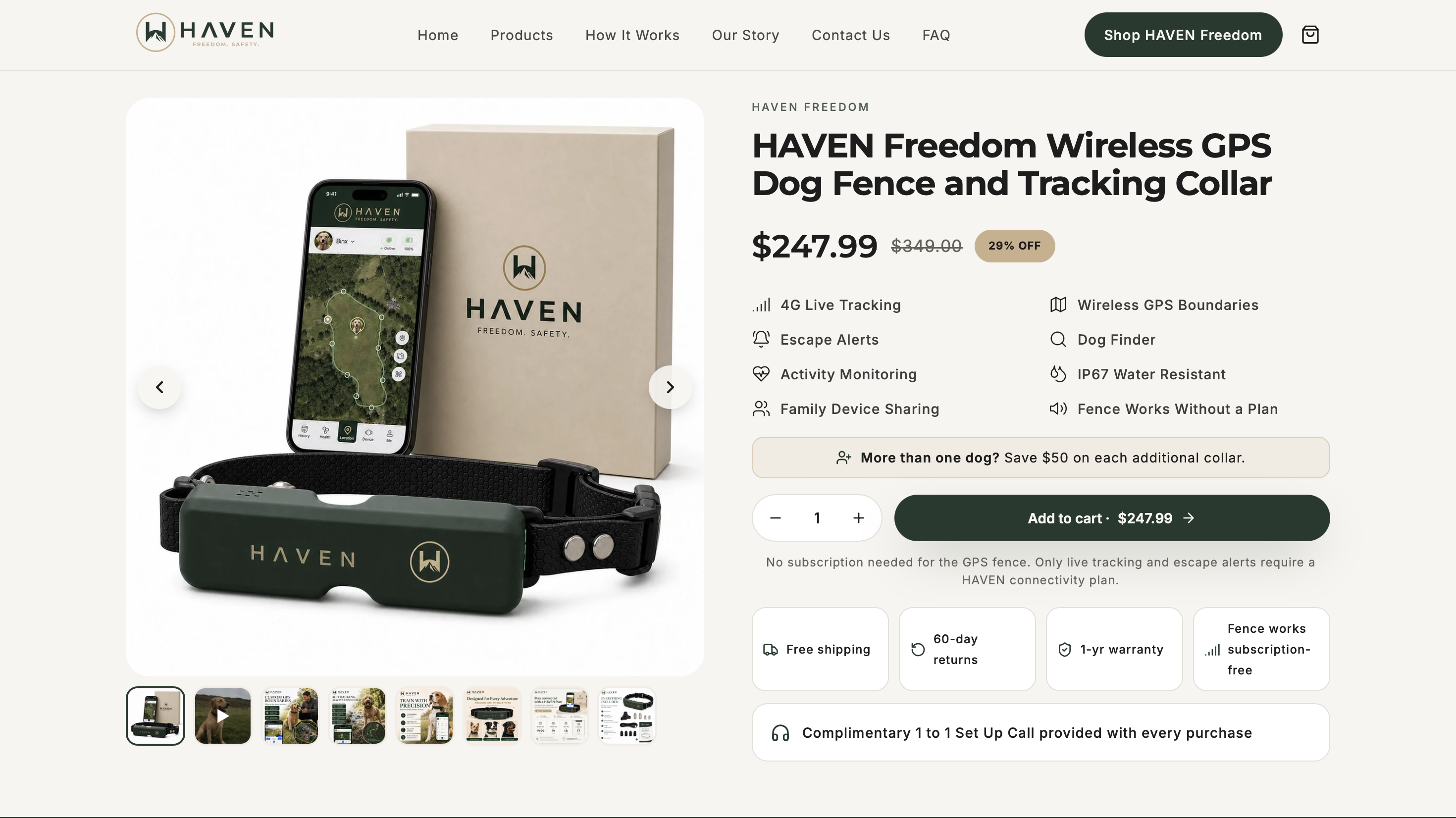
The fence function works with no monthly subscription required. A plan only comes into play if you want the optional extras, live 4G tracking and escape alerts, on top of the core containment. If your dog does slip a boundary, the built in dog finder combines sound, light, and Bluetooth radar to help you recover them fast. Check the full feature set and pricing on the HAVEN Freedom product page, or browse the full collection to see collar and accessory options side by side.
Sources
- How to evaluate a GPS dog fence: What matters for dog safety | AKC
- Veterinary behaviorists: No role for aversive dog training practices | AVMA
FAQ
Can One Collar Really Handle Multiple Safe Zones?
Yes, most GPS collar apps let you create a primary roaming boundary plus several exclusion zones with no strict limit on how many you build. HAVEN Freedom stores customizable boundaries directly on the collar, so you can layer a yard boundary with a pool exclusion zone without any buried wire.
What’s the Difference Between a Circular and Custom Fence?
A circular fence sets a fixed radius from one point and takes seconds to configure. A custom polygonal fence traces your property’s actual shape, which better protects hazards like a pool or garden bed but takes longer to draw.
Does Bad Weather Affect My Mapped Boundaries?
Yes, GPS signals can shift slightly under heavy tree cover, near tall buildings, or in poor weather, a phenomenon known as GPS drift. Testing each zone at different times of day helps you catch drift before it becomes a real escape risk.
Do I Need a Subscription for Multiple Safe Zones to Work?
Not for the fence itself. HAVEN Freedom’s boundary function works without a monthly subscription, and a plan is only needed for optional live tracking and escape alert features through the app.
How Long Does It Take to Train a Dog on a New Zone?
Expect a few weeks of consistent practice per zone, moving from flagged, leashed walks to off-leash exposure with distractions. Rushing this progression is the most common reason dogs keep crossing boundaries despite having a working fence.
Recommended
Keep reading
e collar humane
Humane E Collar Training: 7 Steps, Starting With a Vet Check
See how humane e collar training starts with a vet check, conditions tone and vibration, uses rewards, and reserves static stimulation as a last...
Read the postcoyote safety for dogs
Protect Your Dog from Coyotes in 14 Days with a GPS Boundary
Keep your dog safe from coyotes with immediate steps, yard fixes, hazing, and a 14 day GPS boundary plan you can start today.
Read the postYour adventure starts here
Ready to give your dog more room to roam?
Give your dog more freedom to explore — and give yourself the reassurance of knowing they're never far away.
