

You can share secure, role-based access to your dog’s location and collar controls through a collar-integrated app. Some pet tracking solutions offer owner-managed invites and optional live-tracking plans. Before trusting any setup with a sitter or family member, confirm your collar and phone are compatible, then open the app and send a test invite to a caregiver.
TL;DR:
- Cellular-enabled collars provide more reliable, real-time tracking even when the dog wanders outside the owner’s immediate vicinity.
- Apps with quick revoke options and two-factor authentication reduce security risks when sharing access with caregivers.
- Permission settings should be granular, limiting caregivers to only what they need, such as view-only location or boundary management.
- Compatibility checks and testing boundary alerts before leaving the dog with a new caregiver are essential to prevent misuse.
- Cost varies: basic containment functions often require no subscription, but advanced features like live tracking typically do.
Table of Contents
- How a share dog access app works in practice
- Key features to look for when choosing an app to share access
- Step-by-step: set up shared access securely (owner to caregiver)
- Compatibility, costs, and common limitations
- How HAVEN Freedom supports shared access (publisher proof points)
- Comparison of top share dog access apps with pros and cons
- User reviews and trustworthiness of apps for sharing dog access
- Troubleshooting common issues with shared access apps
- When to share access and when to keep controls owner-only
- Where to get HAVEN Freedom and next steps
- Sources: vet and expert resources used in this article
- FAQ
How a share dog access app works in practice
Most apps built for sharing dog care run on an owner account that controls who else gets in. The owner sends an invite, assigns a role, and sets limits on what that person can see or do. A caregiver might get view-only location access, while a family member gets permission to adjust boundaries or trigger alerts. These invites usually work as temporary tokens, meaning access can be time-limited or revoked the moment it is no longer needed.

The hardware behind this matters too. Some systems rely on a collar with built-in cellular connectivity, which keeps tracking live even when the dog wanders away from the owner’s phone. Others depend on Bluetooth and a nearby paired phone, which works fine in a yard but fails once the dog is out of range. Collar-integrated cellular setups tend to give shared users a more complete picture, since the data comes straight from the device rather than relaying through one person’s phone.
What a shared user can actually do depends on the permission level they’re given. A view-only caregiver can check the dog’s location and get alerts if it crosses a boundary. Someone with manage permissions might adjust geofence boundaries remotely. A smaller group of trusted users might get access to dog-finder tools like sound, light, or Bluetooth radar, which help locate a dog that has slipped a boundary or gotten lost during a walk.
Key features to look for when choosing an app to share access
Not every app marketed for sharing pet access handles security or permissions the same way. A few features consistently separate a workable setup from a risky one.
- Invite flow and revocation: Look for apps that let the owner send a time-limited invite and cut access instantly, without needing the caregiver’s cooperation.
- Two-factor authentication: An extra login step protects the account if a caregiver’s phone is lost or shared.
- Permission granularity: The best apps separate view-only access from boundary management and training controls, so a dog walker isn’t accidentally handed the same power as the owner.
- Tracking update frequency: Faster location refreshes matter more for off-leash adventures than for a fenced backyard.
- Rescue tools: A built-in dog finder using sound, light, or Bluetooth radar can matter more than GPS alone when a dog is close but hidden, such as in brush or under a porch.
Cost and compatibility also shape which features you’ll actually use. A collar with no subscription requirement for its core fence function costs less to maintain than one that locks boundary settings behind a monthly plan.
Pro Tip: Grant the narrowest permission level that still lets the caregiver do their job, then widen it only if a real need comes up.
Step-by-step: set up shared access securely (owner to caregiver)
Setting up shared access takes a few minutes, but skipping a step can leave a gap a stranger could exploit or a sitter could misuse by accident.
- Secure your own account first. Set a strong, unique password and turn on two-factor authentication before inviting anyone else in.
- Create a caregiver role with a defined scope. Decide whether this person needs view-only access, boundary management, or training controls, and set an expiration date on the invite if it’s temporary.
- Send the invite and confirm acceptance. Most apps text or e-mail a link; walk a less tech-comfortable caregiver through accepting it over the phone if needed.
- Test the new account before relying on it. Have the caregiver check the dog’s location from their own phone and confirm they get a notification during a simulated boundary event.
- Check activity logs regularly. Most apps log who accessed what and when; review this periodically and revoke access the moment a sitter’s job ends or a guest leaves.
- Set an emergency procedure. Make sure every caregiver knows what to do if an alert fires and the owner isn’t reachable, including who to call and where the dog typically runs.
Pro Tip: Run the simulated boundary test with the caregiver present at least once before leaving the dog in their care for real.
Compatibility, costs, and common limitations
Most share-access apps need a reasonably current iPhone or Android device, and the collar side splits into two camps: Bluetooth-only, which needs the paired phone nearby, and cellular-enabled, which tracks independently but usually requires a data plan. Cellular models tend to drain battery faster and may space out location updates to compensate.
Coverage gaps show up most in remote, heavily wooded, or rural areas where cell signal thins out. A well-designed app should fall back to last-known-location data and alert the owner that tracking has lapsed, rather than showing a stale pin as if it were current.
Pricing models vary. Many fence or containment features work without any subscription, while live tracking, escape alerts, and advanced app features often sit behind an optional monthly plan. On privacy, location and activity logs are the main data collected; limiting shared permissions and removing a caregiver’s access when it’s no longer needed keeps that footprint small.
How HAVEN Freedom supports shared access (publisher proof points)
Some collars use dual-band positioning systems to create customizable wireless boundaries that need no buried wires, allowing the fence to work without a subscription. A plan may be required for live tracking and other app features, keeping the base cost down for owners who mainly need containment.
Some apps handle common scenarios like granting temporary, view-only access to sitters and dog walkers, allowing family members to see live location and receive alerts without full account control, and setting time-limited invites for short-term guests that expire automatically.
Escape alerts can notify authorized users when a dog crosses a boundary, and dog finder tools may use sound, light, and Bluetooth radar to help locate a dog that has wandered off.
Comparison of top share dog access apps with pros and cons
Apps built around sharing dog care generally fall into three categories, each with trade-offs.
Collar-integrated apps with cellular tracking tend to offer the most complete sharing experience because location data comes straight from the collar rather than depending on a nearby phone. The trade-off is that live tracking and some advanced features typically need an optional plan, though core containment can work without one.
Bluetooth-only pet trackers cost less to run since they skip cellular data fees, but they lose accuracy and connectivity once the dog is more than a short range from a paired phone. That makes them a weaker fit for sharing access with someone who isn’t physically nearby.
Phone-based location-sharing apps, not built specifically for pets, sometimes get repurposed by owners who share a phone’s location with a dog walker. These lack dog-specific features like escape alerts, geofencing tuned for animal movement, or a dog finder, and they offer no real permission granularity since they share an entire phone’s location rather than a pet-specific data stream.
The right choice depends on how far the dog roams and how many people need a role. A single sitter checking in occasionally has very different needs than a family with three people who all need alerts and some of whom need boundary controls.

User reviews and trustworthiness of apps for sharing dog access
When evaluating any app that will manage shared access to a dog’s location and collar controls, pay attention to how it handles permission changes and revocation, not just tracking accuracy. A tracker with great GPS but no way to quickly cut off a former caregiver’s access creates a real security gap.
Trustworthy apps are explicit about what data they collect and who can see it. Vague privacy language or unclear permission settings are red flags worth weighing against convenience features. Owners researching any pet tracking app should look for a company that documents its device specs and plan structure clearly on its own site, rather than relying only on marketplace reviews, since specs and features can change between hardware generations.
It also helps to separate complaints about tracking performance in general (range, battery life, signal gaps in rural areas) from complaints about the sharing feature specifically (invite failures, permission bugs, confusing revocation). The two are different problems, and an app can get one right while struggling with the other.
Troubleshooting common issues with shared access apps
A few problems come up often enough to plan for in advance.
Invite not received or expired: Resend the invite and double-check the caregiver’s e-mail or phone number was entered correctly; most apps set a short expiration window for security.
Caregiver can’t see live location: This usually traces back to a permission setting that was never fully applied, or the caregiver’s app needing a restart to sync with the account.
Alerts arrive late or not at all: Check that notification permissions are enabled on the caregiver’s phone, and confirm the collar has cellular or Bluetooth connectivity in the dog’s typical area.
Access won’t revoke: Force a log-out from the owner’s account settings and change the account password as a backup if revocation doesn’t take effect immediately.
Boundary data looks stale: In spots with weak signal, especially farm or rural properties, the app should flag that the last location is outdated rather than displaying it as current; if it doesn’t, treat any location data as unconfirmed until you get a fresh signal.
When to share access and when to keep controls owner-only
Share access when it genuinely lowers risk, such as giving a sitter alerts during off-site walks or letting a second family member confirm the dog made it home safely. Keep training interventions and boundary changes owner-only until a caregiver has proven reliable, since a mistimed correction or shifted boundary can do real harm. Watching a dog’s body language around a new caregiver, rather than assuming comfort, is a better gauge of whether direct control is safe to hand over.
— Haven
Where to get HAVEN Freedom and next steps
HAVEN Freedom answers the share dog access question directly: wireless boundaries that need no buried wires, live tracking and escape alerts through an optional plan, and a dog finder for the moments a boundary gets crossed anyway. The product page lists the collar’s specs, the one-time $349 price, and the optional app plans, so you can see exactly what’s included before buying.
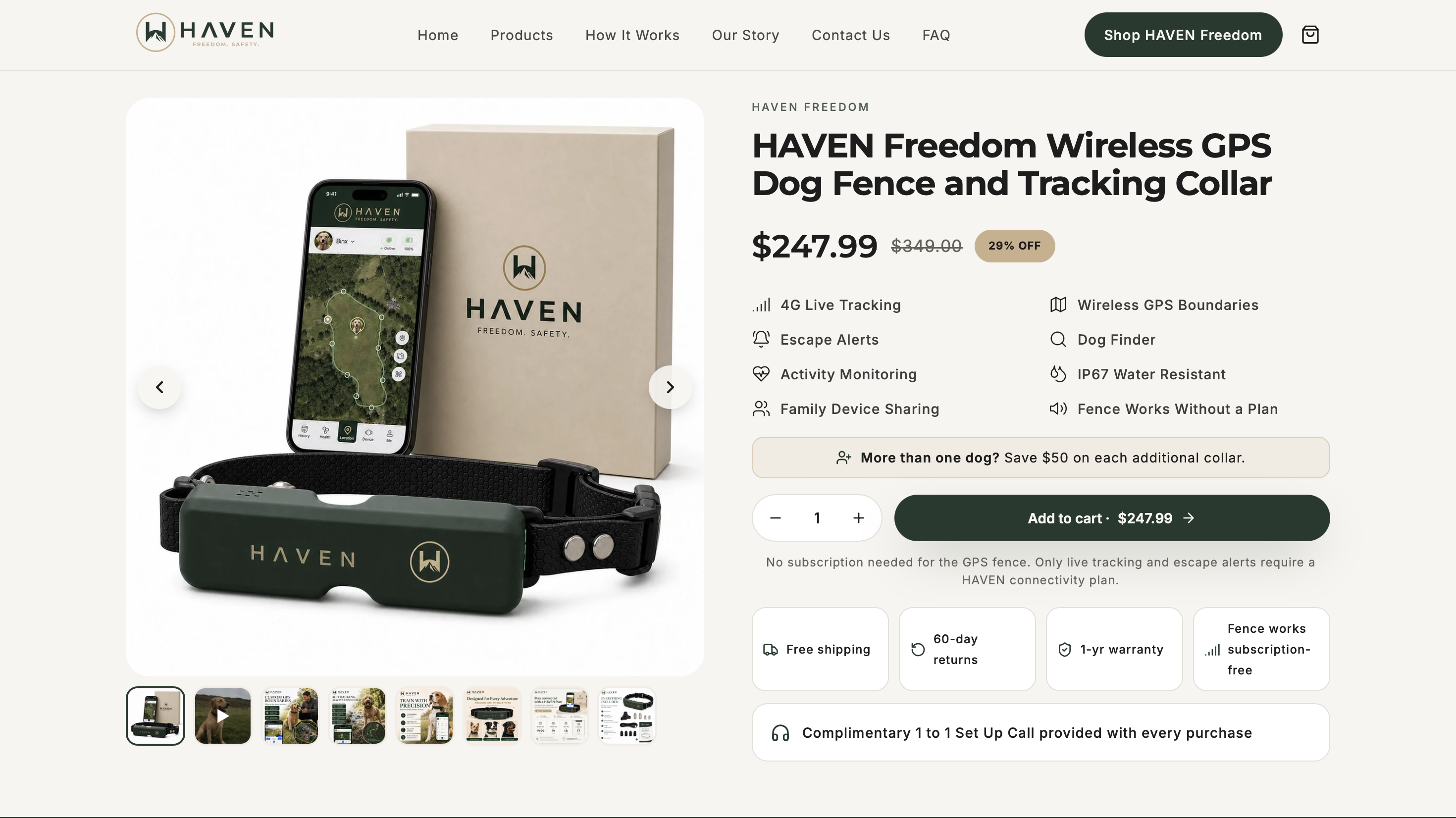
Before relying on shared access for a sitter or family member, a couple of checks save headaches later.
- Confirm your phone’s operating system and the collar’s connectivity match before setup.
- Run a test invite and boundary check with your caregiver present at least once.
Browse the full HAVEN Freedom lineup to see current options and get started.
Sources: vet and expert resources used in this article
Behavior and communication guidance in this article draws on the American Kennel Club, AVMA, VCA Animal Hospitals, and the Merck Veterinary Manual.
FAQ
Is there a dog share app?
Yes, several apps let owners share dog location and collar access with caregivers through role-based permissions. HAVEN Freedom is one option, offering owner-managed invites alongside its wireless boundary and tracking collar.
What is the 7 7 7 rule for dogs? There is no recognized veterinary standard behind a “7-7-7” rule for dogs. Canine communication is better understood through body language, scent, and vocal cues read together rather than a fixed numeric formula.
There is no recognized veterinary standard behind a “7-7-7” rule for dogs. Canine communication is better understood through body language, scent, and vocal cues read together rather than a fixed numeric formula.
What is the highest form of affection from a dog?
Affection from a dog shows up through behavior like choosing to stay close, relaxed body language, and play bows rather than through any single signature gesture. The American Kennel Club notes these cues matter more than anthropomorphic comparisons to human affection.
How do I say “I love you” in dog language?
Dogs read calm tone, consistent cues, and physical closeness more reliably than specific words. Reward-based training with a steady tone tends to build trust more effectively than volume or verbal phrasing alone.
Does sharing dog tracking access require a subscription?
It depends on the app and collar. With HAVEN Freedom, the core wireless fence works without a subscription, while live tracking and some app features require an optional plan, as listed on the product page.
Recommended
Keep reading
e collar humane
Humane E Collar Training: 7 Steps, Starting With a Vet Check
See how humane e collar training starts with a vet check, conditions tone and vibration, uses rewards, and reserves static stimulation as a last...
Read the postcoyote safety for dogs
Protect Your Dog from Coyotes in 14 Days with a GPS Boundary
Keep your dog safe from coyotes with immediate steps, yard fixes, hazing, and a 14 day GPS boundary plan you can start today.
Read the postYour adventure starts here
Ready to give your dog more room to roam?
Give your dog more freedom to explore — and give yourself the reassurance of knowing they're never far away.
