

For households tracking more than one dog, the fastest way to stay safe is a GPS collar system that runs on a single app with per-dog profiles. HAVEN Freedom delivers exactly that, with live tracking, wireless geofences, and multi-collar management in one dashboard. The tradeoffs to weigh are refresh rate against battery drain, and subscription cost against containment that works without one.
TL;DR:
- HAVEN Freedom provides a single app that displays all dogs with color-coded profiles and real-time updates, essential for quick response.
- The system offers independent geofence controls for each dog and supports multiple users simultaneously, improving household oversight.
- Live tracking refresh rates are typically 2 to 3 seconds for accuracy, but faster updates reduce battery life, requiring careful management.
- The subscription cost scales with pack size, often around $5 to $15 per dog per month, but HAVEN offers discounts and free service periods for multiple collars.
- In environments with poor satellite signals, Bluetooth tools supplement GPS for close-range recovery, with GPS accuracy affected by urban or wooded conditions.
Table of Contents
- What Makes HAVEN Freedom Work for Multiple Dogs?
- How Do You Evaluate a GPS Collar for Multiple Dogs?
- How Does Multi-Dog GPS Tracking Actually Work?
- Setting Up Multiple HAVEN Collars in One App
- What Do Multiple GPS Collars Actually Cost You?
- How Do You Keep Multiple Collars Charged and Working?
- Why a Single Dashboard Changes the Outcome
- Get Multiple HAVEN Collars Set Up in One Household Account
- Sources
- FAQ
What Makes HAVEN Freedom Work for Multiple Dogs?
Running three dogs on three separate apps is how owners miss an escape alert. HAVEN Freedom solves the coordination problem by putting every collar in your household under one account, with each dog showing up as its own image marker. You open one app, see every dog’s position at once, and know instantly which one just crossed a boundary.
That single-dashboard setup matters more than most buyers expect. Multi-dog roundups consistently point to color-coded profiles and fast escape alerts as the feature that separates a genuinely useful multi-dog tracker from one that just happens to support more than one collar. A system built for a single pet. HAVEN was built the other way around, with multiple collars as the default use case.
Here’s what a multi-dog household actually gets:
- Shared access across the family. Multiple people can log in and see the same dashboard, so whoever is home can check on the dogs without passing around one phone.
- Live tracking with wireless geofencing. No buried wire, no trenching your yard. You draw the boundary in the app, and the collar keeps each dog inside it.
- Escape alerts per dog. If one dog slips past the boundary, you get a notification naming that specific dog, not a generic alert you have to investigate.
- Dog finder with sound, light, and Bluetooth. When GPS alone isn’t precise enough, close-range recovery tools help you close the last few yards in thick brush or after dark.
The economics change meaningfully once you’re buying for more than one dog. A certain provider includes a significant amount of free data when you buy multiple collars, which breaks down to about a year of service per collar. On top of that, every collar beyond your first comes with a discount that scales with the size of your pack, unlike most subscription-based trackers pricing multi-pet ownership.
Pro Tip: Assign each dog a distinct color and a real photo in the app the same day the collars arrive. It sounds trivial, but during an actual escape, recognizing “the orange dot” faster than reading a name label saves real seconds.
Who gets the most value here? Multi-dog hikers who need every collar visible on a trail map. Owners of escape-prone packs, especially mixed breeds with different fence-jumping habits. And families where one dog is still in training and needs a tighter boundary than an older, more reliable dog. HAVEN’s per-collar management handles all three scenarios inside the same app, without buying a second app license or a second base station.
How Do You Evaluate a GPS Collar for Multiple Dogs?
Not every “supports multiple pets” claim means the same thing. Some systems technically let you add a second device but still make you toggle between separate sessions to see each dog’s location. Before you buy, run the system through these checks.
- Check the update frequency, not just the marketing claim. Live mode with a 2 to 3 second refresh is the benchmark for active tracking during a hike or an escape. A collar that only updates every few minutes is fine for casual location checks but useless in a real chase.
- Weigh refresh rate against battery life honestly. Faster updates burn more battery. If you’re managing four or five collars, that tradeoff compounds fast, and you need a realistic sense of how many hours of live mode you’ll actually get per charge.
- Confirm per-dog geofence controls. Your Border Collie and your senior Lab probably don’t need the same boundary size or sensitivity. A system worth buying lets you set each dog’s fence independently, not one boundary applied to the whole household.
- Read the subscription structure carefully. Some trackers charge per collar per month with no discount for volume. Others, including HAVEN’s containment mode, work without any subscription at all for basic fence functionality, reserving the paid plan for live tracking and app extras.
- Check collar weight and fit range for your smallest and largest dog. A collar sized for a 70-pound shepherd is going to look and feel wrong on a 20-pound terrier, and comfort affects whether the dog tolerates wearing it consistently.
- Verify the waterproof rating. Multi-dog households are often multi-activity households, meaning mud, rain, and the occasional pond. A collar that isn’t genuinely rated for that use will fail exactly when you need it most.
- Ask about device limits per account. Some apps cap the number of collars you can register, which matters a lot if your household includes four dogs, not two.
- Look at how support handles multi-device issues. A single dead collar shouldn’t require you to reset your entire account or lose visibility into the other dogs while it’s resolved.
Wirecutter’s testing found that accuracy and refresh rate separate the reliable trackers from the mediocre ones even among well-reviewed consumer products. That’s worth remembering when a listing leads with app design screenshots but says little about how often the location actually updates.
How Does Multi-Dog GPS Tracking Actually Work?
Understanding the tech behind these collars sets realistic expectations, especially the difference between GPS and cellular data. GPS satellites tell the collar where it is on Earth. Cellular data, running on networks like LTE-M, is how that location gets from the collar to your phone in something close to real time. Without the cellular link, GPS coordinates just sit on the device with nowhere to go.
This is why “live mode” costs more battery and, on most systems, requires an active data plan. The collar isn’t just calculating position, it’s transmitting that position continuously over a cellular connection. Turn live mode off and most collars fall back to periodic check-ins, updating every few minutes instead of every few seconds.
GPS accuracy also isn’t constant. A review of tracking technology performance found that GPS reliability drops in urban canyons, dense tree cover, and other environments where satellite signal gets blocked or bounced. Open fields give you tight accuracy. A downtown block surrounded by tall buildings, or a thick forest canopy, will not.
On the account side, HAVEN maps this to something simple: each collar gets a unique device ID, which includes a dog finder QR code incase your pet gets lost.
A few things to know about edge cases:
- When a collar loses power, it stops transmitting live position. The app will show a last-known-location marker with a timestamp, which is your starting point for a physical search.
- When a collar goes out of cellular range entirely, the same last-known-location behavior applies, even if the battery is fine.
- Bluetooth recovery only works at close range, so it’s a final-approach tool, not a replacement for GPS during the initial search.
- Microchips remain a separate layer of protection. Veterinary guidance from the AVMA is clear that registered microchips matter alongside GPS, not instead of it, since a chip is what gets a found dog back to you if the collar comes off.
Setting Up Multiple HAVEN Collars in One App
Getting several collars running correctly on day one takes about the same effort as setting up one, mostly because HAVEN’s onboarding was built around households with more than a single dog from the start.
The pairing sequence is straightforward. Each collar connects to your account individually, and the app prompts you to name the dog and attach a photo as soon as pairing finishes. Assign a distinct color to each profile right away, since that color is what you’ll be scanning for on the map during any future incident, and consistency here builds muscle memory fast.
Boundaries come next, and this is where HAVEN’s approach differs from buried-wire fencing. You draw each dog’s wireless geofence directly in the app, no trenching, no wire, no professional installer. Dogs with different training levels or different risk tolerances can get different boundary shapes and sizes on the same property, all managed from the same account.
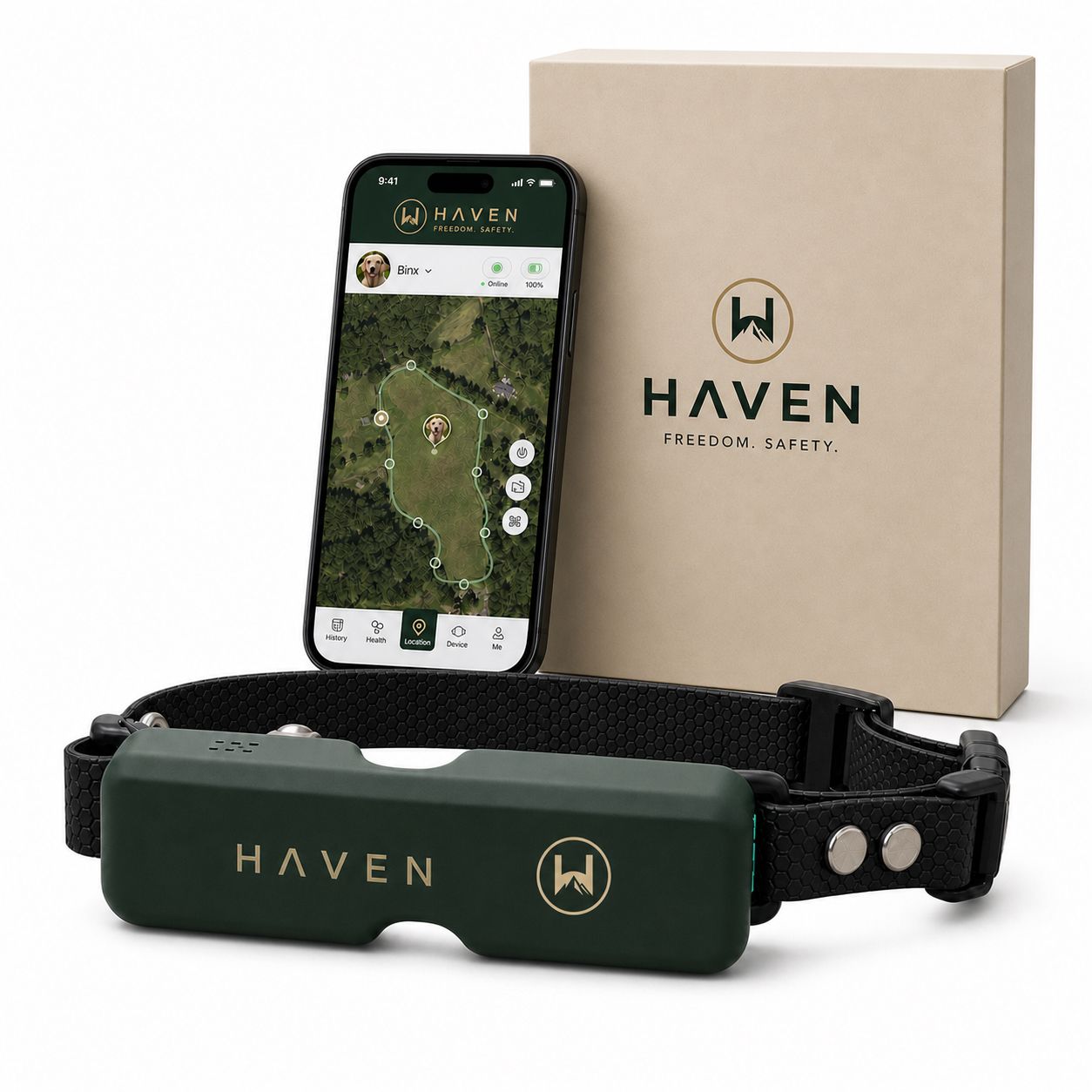
For actual recovery, HAVEN’s dog finder tools layer together. Sound and light draw the dog’s attention if they’re nearby but out of sight, useful in yards with dense landscaping or at night. Bluetooth gives you a directional read at close range once you’re in the general area, closing the gap that pure GPS can’t always handle precisely. That combination is exactly why close-range tools complement GPS rather than replace it.
A few practices make multi-dog management noticeably smoother:
- Charge collars on a staggered schedule rather than all at once, so you’re never left with every dog uncollared during a single charging window.
- Label physical chargers to match each dog’s app color, avoiding mixed-up charging cables at 6 a.m.
- Share account access with every adult in the household, so whoever’s home can respond to an alert without hunting for a specific phone.
- Review each dog’s boundary monthly, especially for a dog still in training, since fence sensitivity that worked at eight weeks in often needs adjusting.
Pro Tip: After pairing a new collar, walk your intended boundary line yourself with the collar in hand before letting the dog near it. It takes ten minutes and confirms the geofence matches your actual property line before a real test happens with a dog on the other side of it.
What Do Multiple GPS Collars Actually Cost You?
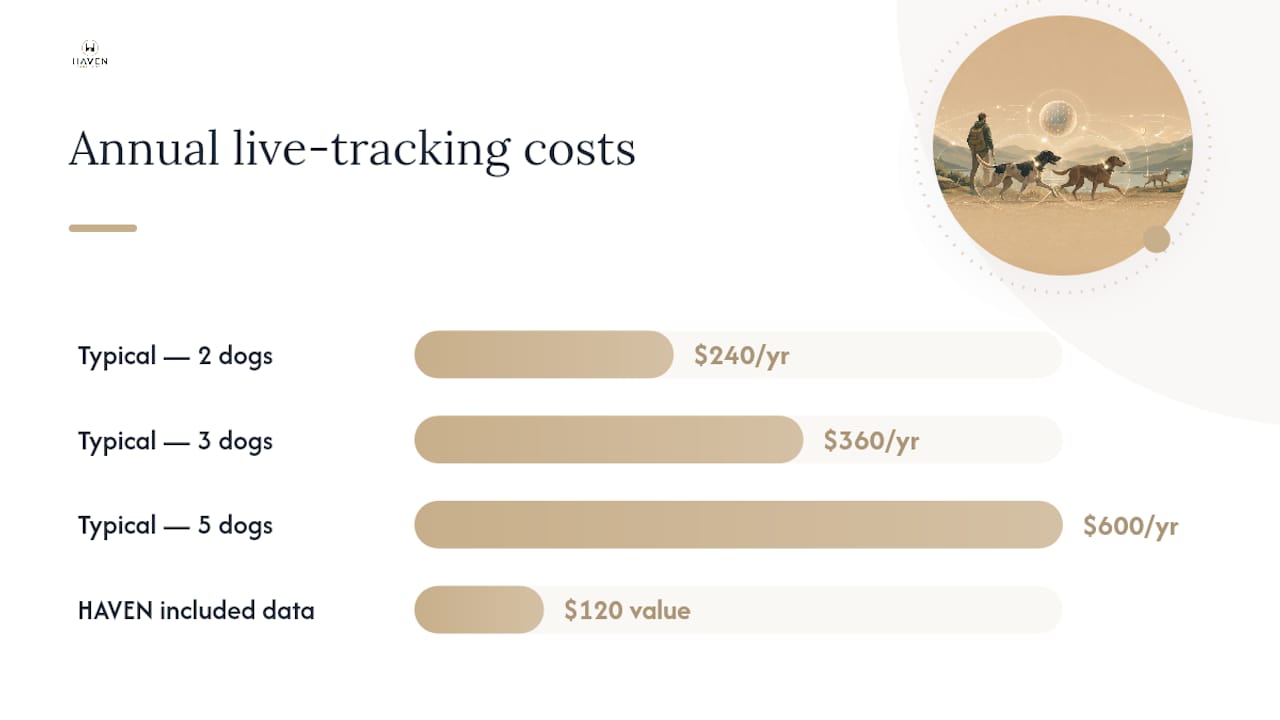
Most multi-pet GPS systems on the market run $5 to $15 per dog per month for live tracking and app features, with no volume discount for owning more than one collar. That pricing model punishes exactly the households that need it most: the ones with three or four dogs instead of one.
Run the math on a typical multi-pet monthly plan at the middle of that range, say $10 per dog:
- Two dogs: roughly $20 a month, or $240 a year.
- Three dogs: roughly $30 a month, or $360 a year.
- Five dogs: roughly $50 a month, or $600 a year.
Compare that to how HAVEN structures the same purchase. Buy two collars and you get $120 worth of data included free, which works out to 12 months of service on each collar at $60 apiece. That’s a full year of live tracking before a subscription decision even comes up. Layer the per-collar discount on top: $50 off your second collar, $100 off if you add a third, and the savings keep climbing with pack size. A five-dog household buying five collars at once would be stacking $200 in per-collar discounts before data costs enter the picture at all.
The included data offer changes early adoption math specifically for households buying more than one collar at a time, since the free year removes the biggest barrier to trying live tracking on every dog rather than just the one that’s escaped before.
Not every household needs live tracking running constantly, though. HAVEN’s wireless geofence containment mode works without any subscription at all. If your priority is simply keeping dogs inside the yard boundary and getting an escape alert, that core function doesn’t require a paid plan. You lose live GPS tracking and some app extras in that mode, but the fence itself keeps working. For a full breakdown of what ongoing containment costs look like over time, HAVEN’s guide to GPS dog fence ownership costs walks through the longer-term numbers.
How Do You Keep Multiple Collars Charged and Working?
A tracking system is only as good as its battery. The most common failure mode in multi-dog households isn’t a broken collar, it’s a dead one that nobody noticed until the dog was already gone.
- Run a full test the day collars arrive. Pair each device, walk the intended boundary perimeter, and deliberately trigger an escape alert to confirm it fires correctly on your phone.
- Verify last-known-location behavior before you need it. Turn one collar off temporarily and check that the app shows a clear last-seen marker and timestamp, so you know what to expect if a collar ever loses power in the field.
- Build a charging rota for 2 to 6 dogs. Stagger charge times across the week so you’re never caught with multiple dead collars simultaneously, and rotating charging schedules is what turns a multi-dog system reliable rather than fragile.
- Label chargers by dog color, matching the profile colors you set during onboarding, to avoid grabbing the wrong cable in a rush.
- Keep a spare battery or fast-charge cable on hand for the dog most likely to need an unplanned recharge, typically whichever one gets the longest daily walks.
- Adjust live mode settings for long outings. Dropping to a longer refresh interval during an all-day hike conserves battery for when you actually need constant updates, like the drive home or an unexpected off-leash moment.
Pro Tip: Set a recurring weekly reminder to check every collar’s battery percentage, not just the one belonging to the dog who’s escaped before. The “well-behaved” dog is usually the one whose collar battery nobody’s been watching.
For a full setup walkthrough, HAVEN’s two-hour boundary setup guide covers the initial perimeter process step by step.
Why a Single Dashboard Changes the Outcome
Picture the moment a gate gets left open with three dogs in the yard. Two come back when called. The third doesn’t. That’s the scenario multi-dog tracking exists for, and it’s also the scenario where switching between separate apps or separate logins costs you the minutes that matter most.
A single dashboard doesn’t just save clicks. It changes what you notice first. When every dog shows up as a colored dot in the app, a marker that’s stopped moving or drifted outside the boundary line jumps out immediately.
The learning curve here is smaller than people expect. Most of the setup work, naming dogs, picking colors, drawing boundaries, happens once and rarely needs revisiting. After the first week, checking on three or four dogs takes the same glance as checking on one. HAVEN’s own boundary training resources walk through the early adjustment period for dogs still learning where the fence line sits, which is usually the part that takes patience, not the technology itself.
Get Multiple HAVEN Collars Set Up in One Household Account
Havenfreedom is the practical alternative to running separate subscriptions and separate apps for every dog in your house. Every HAVEN collar joins the same account, on the same map, with no per-dog app switching required.
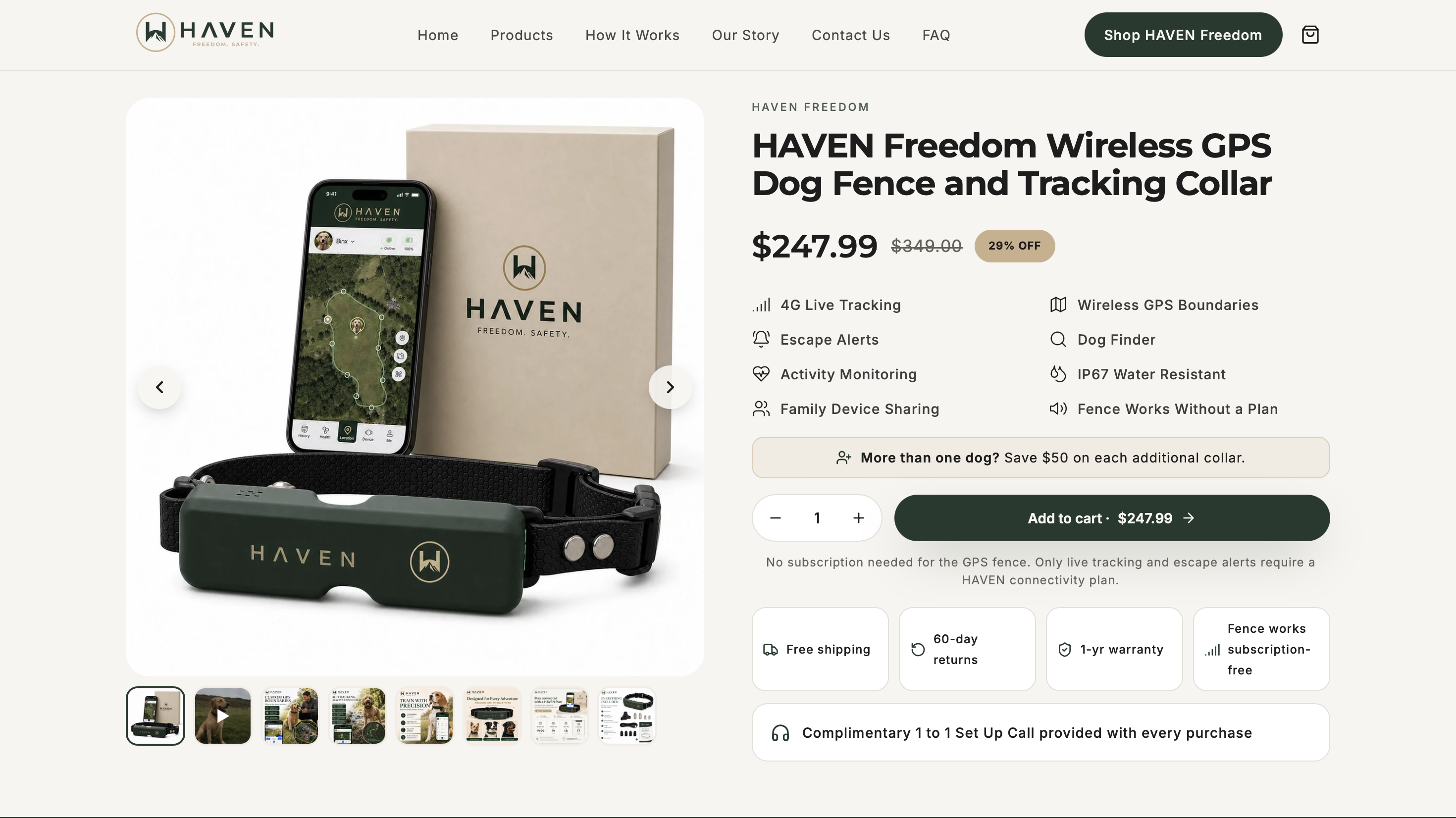
Buying multiple collars sometimes includes bundled data and discounts, with each collar shipping ready to pair and activation handled through an app, without the need for professional installation or buried wires.
Head to the HAVEN Freedom product page to check current bundle pricing and get your collars added to cart before checkout. If you’re outfitting more than two dogs, the per-collar discount makes buying the full set at once the more cost-effective route than spacing out purchases over time.
Sources
- Top 10 Dog GPS Trackers for Multiple Dog Households
- The 4 Best GPS Pet Trackers of 2026 | Reviews by Wirecutter
- Research article on GPS tracking performance
- AVMA: Check a Chip Day — importance of microchip registration
FAQ
Is There a GPS Dog Collar That Requires No Monthly Subscription?
Yes. HAVEN Freedom’s wireless geofence containment mode works without any subscription, keeping the boundary functional. A paid plan is only needed for live GPS tracking and certain app extras.
Is an AirTag or a GPS Collar Better for Tracking a Dog?
A dedicated GPS collar is the better choice for dogs, since it uses cellular data for near real-time updates and works over long distances, while Bluetooth-based trackers like an AirTag depend on nearby devices and have far shorter effective range.
Do GPS Dog Collars Actually Work?
Yes, though effectiveness depends on environment. GPS accuracy is strong in open areas but drops in urban canyons and dense tree cover, which is why pairing GPS with close-range tools like Bluetooth improves recovery odds in tricky terrain.
Do All GPS Dog Collars Require a Subscription?
No. Most systems do charge $5 to $15 per dog monthly for live tracking, but some, including HAVEN Freedom, offer containment functionality with no subscription and reserve paid plans strictly for live tracking and premium app features.
Does a GPS Collar Replace Microchipping?
No. Veterinary guidance from the AVMA treats microchip registration as a separate, necessary layer of pet identification, since a chip is what confirms ownership if a collar comes off before a dog is found.
Recommended
Keep reading
e collar humane
Humane E Collar Training: 7 Steps, Starting With a Vet Check
See how humane e collar training starts with a vet check, conditions tone and vibration, uses rewards, and reserves static stimulation as a last...
Read the postcoyote safety for dogs
Protect Your Dog from Coyotes in 14 Days with a GPS Boundary
Keep your dog safe from coyotes with immediate steps, yard fixes, hazing, and a 14 day GPS boundary plan you can start today.
Read the postYour adventure starts here
Ready to give your dog more room to roam?
Give your dog more freedom to explore — and give yourself the reassurance of knowing they're never far away.
